How to Write an Email: The Complete Guide with Examples
You have something important to say, but you are staring at a blank email draft. What if it sounds too pushy? What if it is too vague? You worry it will be ignored or misunderstood. You are not sure how formal to be or how to structure your message.
You are not alone. Writing an email is a daily task for billions of people, yet it remains one of the most common sources of workplace confusion, miscommunication, and stress. A well-crafted email can build relationships, open doors, and get things done. A poorly written one can damage your reputation and waste everyone's time.
This guide will teach you everything you need to know about how to write a professional email that gets results. We will cover the structure, the tone, the etiquette, and the common mistakes to avoid. By the end, you will have the tools to write emails that are clear, effective, and reflect well on you.
Email Writing at a Glance
1 What Is a Professional Email and Why Does It Matter?
A professional email is a written message used for business, academic, or official communication. It is a key tool for conveying information, making requests, building relationships, and getting work done. Unlike casual messages, professional emails follow specific conventions of structure, tone, and etiquette.
Emails matter because they are often the primary mode of professional communication. They create a permanent written record and represent your professionalism. A well-written email makes you look competent, thoughtful, and respectful. A poorly written one can create confusion, damage relationships, and harm your career.
In a fast-paced world, people receive hundreds of emails every day. A clear, concise, and professional email respects the reader's time and increases the likelihood that your message will be read and acted upon.
Professional Image
Every email you send is a reflection of your professionalism and attention to detail. It shapes how colleagues and clients perceive you.
Clear Communication
Well-structured emails ensure your message is understood the first time, reducing the need for follow-up questions and saving time.
Written Record
Emails create a permanent written record of communications, which can be important for tracking decisions, agreements, and responsibilities.
Builds Relationships
A thoughtful, professional email can strengthen business relationships and show that you value the recipient.
2 The Fundamentals of Writing an Email
Before you start typing, you need to understand the foundational principles that underpin every effective professional email.
Be Clear and Concise
Business communication should be direct and to the point. State your purpose clearly in the first paragraph. Avoid unnecessary words or fluff. Your reader is busy — respect their time by getting straight to the point.
Use a Professional Tone
Your tone should be polite, respectful, and businesslike. Avoid overly casual language, slang, or emotional outbursts. Even when addressing a complaint, maintain a professional and measured tone.
Know Your Audience
Tailor your email to the recipient. Consider their position, their relationship to you, and what they need to know. An email to a long-term client will differ from an email to a new supplier or a colleague.
The "BLUF" Principle
In professional email writing, use the BLUF (Bottom Line Up Front) approach. State your main point or request in the first sentence. Then provide supporting details. This respects the reader's time and ensures your message is understood even if they only scan the email.
3 How to Format a Professional Email
Proper email formatting is essential for readability and professionalism. Here are the standard formatting rules.
Subject Line
A clear, specific subject line is the most important part of your email. It determines whether your email is opened, ignored, or sent to spam. It should summarize the content and purpose of your email in a few words.
Salutation
Use a professional salutation. "Dear [Name]," for formal emails. "Hi [Name]," or "Hello [Name]," for less formal but still professional emails. Avoid overly casual greetings like "Hey" in a professional context.
Body
Keep your email concise and well-organized. Use short paragraphs and bullet points for lists. State your purpose clearly and provide only the necessary details.
Closing
Use a professional closing. "Best regards," "Sincerely," "Yours faithfully," or "Thank you," are all appropriate. Include your full name, title, and contact information in your signature.
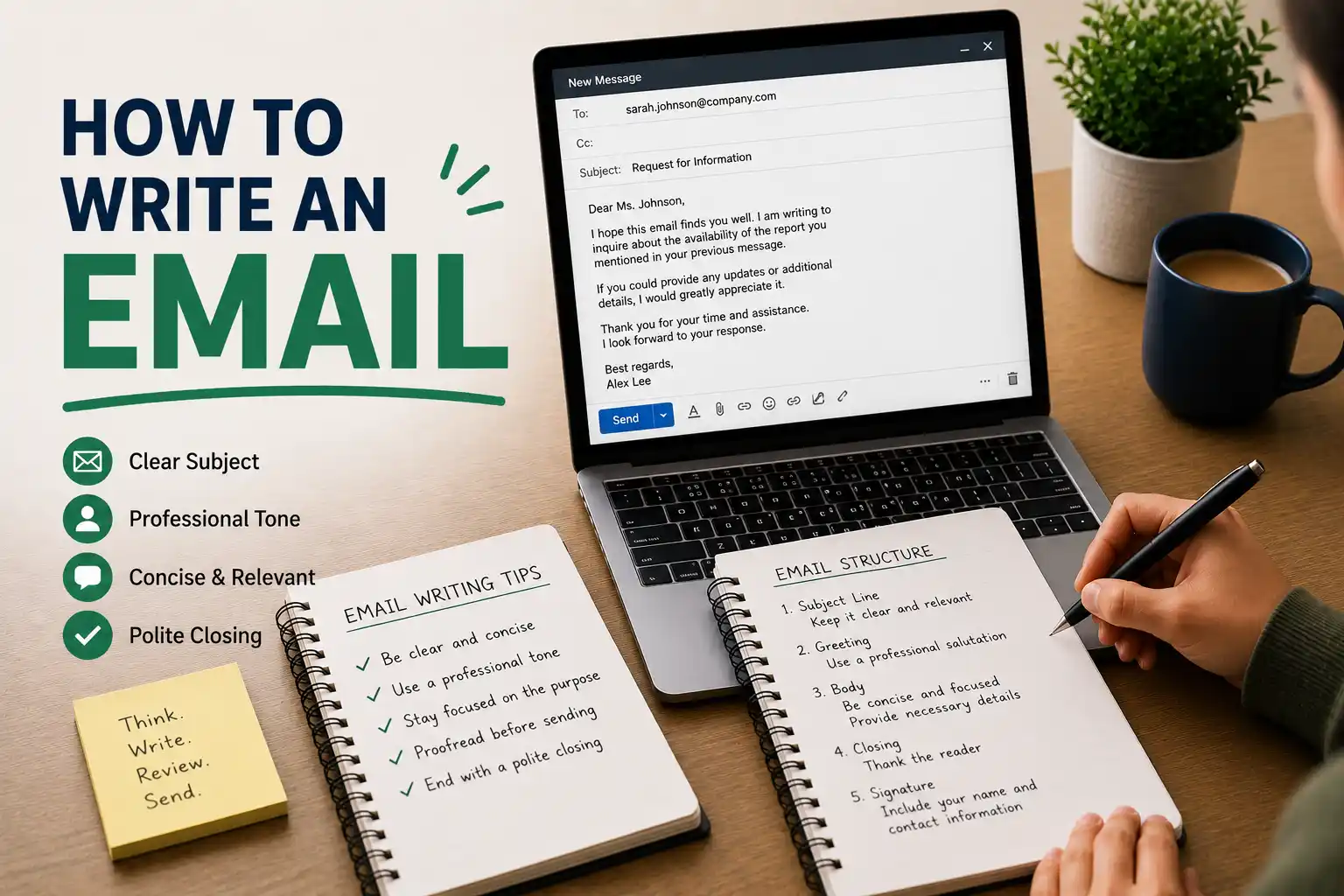
Standard Email Structure
- Subject Line: Clear, specific, and actionable
- Salutation: "Dear [Name]," or "Hi [Name],"
- Opening: State your purpose directly
- Body: Provide details and supporting information
- Closing: Summarise and state any follow-up action
- Signature: Your name, title, and contact information
4 What to Include in a Professional Email
Every professional email should include certain essential elements. Here is what to include, section by section.
Clear Subject Line
Summarize the purpose of your email. "Meeting Request: Project Update," "Invoice #12345 Attached," or "Application for Marketing Manager Position." A good subject line helps the reader prioritize and file your email.
Appropriate Salutation
Address the recipient by name whenever possible. Use their correct title (e.g., Mr., Ms., Dr., Prof.). If you are unsure, "Dear [Full Name]" is a safe option.
Clear Purpose
State your purpose in the first sentence. Why are you writing? What do you want the reader to know or do? Get straight to the point.
Relevant Details
Provide the necessary details to support your purpose. Be concise and avoid unnecessary information. Use bullet points for lists to improve readability.
Call to Action
What do you want the reader to do? Be specific. "Please reply to confirm your attendance," or "Could you review the attached document by Friday?" A clear call to action increases the likelihood of a response.
Professional Signature
Include your full name, title, company name, phone number, and any other relevant contact information. A professional signature adds credibility and makes it easy for the recipient to contact you.
Sample Professional Email
Subject: Meeting Request: Project Update
Dear Ms. Johnson,
I hope this email finds you well. I am writing to request a brief meeting to discuss the current status of the project and our upcoming deadlines.
We have made significant progress, but I would like to review the next steps and ensure we are aligned on the timeline. Could we meet for 30 minutes this Thursday or Friday?
Please let me know what time works best for you.
Best regards,
[Your Name]
[Your Title]
[Phone Number]
5 How to Write an Email: Step-by-Step
Here is a step-by-step process for writing a professional email.
Step 1: Define Your Purpose
Before you write, be clear about why you are writing. What is your goal? What do you want the reader to know or do? This will guide everything you write.
Step 2: Know Your Audience
Consider who you are writing to. What is their role? What do they need to know? What is their relationship to you? Tailor your email accordingly.
Step 3: Write the Subject Line
Write a clear, specific subject line that summarizes your purpose. This is the first thing the reader will see.
Step 4: Write the Opening
State your purpose clearly and directly in the first sentence. Use the BLUF principle — get straight to the point.
Step 5: Write the Body
Provide the details and supporting information. Be clear, concise, and logical. Use bullet points for lists if appropriate.
Step 6: Write the Closing
Summarise your main point and state any follow-up action. Thank the reader for their time.
Step 7: Revise and Proofread
Check for clarity, tone, and errors. A polished email demonstrates professionalism.
6 Common Mistakes to Avoid
Even experienced professionals make mistakes. Here are the most common errors and how to avoid them.
Vague Subject Line
Using subject lines like "Hi" or "Question" or "Important." These are easily ignored or overlooked.
Fix: Write a clear, specific subject line that summarizes your purpose.
Being Too Informal
Using casual language, slang, or informal greetings in a professional email.
Fix: Keep the tone professional and businesslike. Use formal salutations and closings.
Overly Long Emails
Writing lengthy emails that are difficult to read. Busy people do not have time to read long, rambling messages.
Fix: Keep your email concise. Use short paragraphs and bullet points.
Forgetting Attachments
Mentioning an attachment but forgetting to include it. This is frustrating for the recipient.
Fix: Attach the file before you start writing the email, or double-check before sending.
Typos and Errors
Sending an email with spelling or grammar errors. This suggests a lack of attention to detail.
Fix: Proofread carefully before hitting send. Use spell-check.
Using "Reply All" Inappropriately
Using "Reply All" when the reply is only relevant to the sender. This clutters everyone's inbox.
Fix: Only use "Reply All" when everyone on the thread needs to see your response.
7 Types of Professional Emails
There are many types of professional emails, each with a specific purpose. Here are the most common types.
Cold Emails
Sent to someone you do not know. The goal is to introduce yourself, build a connection, or make a request. Personalization is key.
Key trait: Personalized, concise, and offers value.
Follow-up Emails
Sent after a meeting, interview, or initial contact. Reinforces your interest, expresses thanks, and keeps the conversation going.
Key trait: Timely, appreciative, and references previous interaction.
Internal Emails
Sent to colleagues within your organisation. Used for updates, requests, and collaboration. Tone can be slightly less formal.
Key trait: Collaborative, clear, and action-oriented.
Client Emails
Sent to clients or customers. Focuses on providing value, building trust, and maintaining relationships. Tone should be professional and courteous.
Key trait: Professional, client-focused, and solution-oriented.
Complaint Emails
Used to express dissatisfaction and seek resolution. Should be professional, constructive, and clear about the desired outcome.
Key trait: Clear, constructive, and professional.
Thank You Emails
Used to express appreciation for a gift, favour, or professional opportunity. Should be specific and sincere.
Key trait: Sincere, specific, and timely.
8 Tone and Language in Professional Emails
The tone and language of your email are just as important as the content. Here is how to get them right.
Be Polite and Respectful
Use courteous language. "Please," "thank you," and "I would appreciate" go a long way. Even when addressing a complaint, maintain respect.
Use Active Voice
Active voice is clearer and more direct than passive voice. "We will review your application" is stronger than "Your application will be reviewed."
Avoid Jargon and Buzzwords
Use plain language that is easy to understand. Avoid industry jargon unless you are sure the reader will understand it.
Be Positive
Focus on solutions and positive outcomes. Even when discussing problems, frame them constructively.
Professional Language
"I would appreciate it if you could review the document by Friday."
Unprofessional Language
"Get this done by Friday."
9 How to Revise Your Email
A great email is not written; it is rewritten. Revision is where your email goes from good to great. Here is a step-by-step process for revising your email.
Step 1: Check for Errors
Check for spelling, grammar, and punctuation errors. Read it aloud to catch awkward phrasing.
Step 2: Check the Clarity
Is your purpose clear? Is the email easy to read and understand? If not, revise for clarity.
Step 3: Check the Tone
Is the tone professional and respectful? Is it appropriate for the recipient and the situation?
Step 4: Check the Subject Line
Is the subject line clear, specific, and actionable? Does it match the content of the email?
Step 5: Check the Call to Action
Is it clear what you want the reader to do? If not, add a clear call to action.
Step 6: Check Attachments
If you mentioned an attachment, make sure you have actually attached it.
10 Practice Exercises to Improve Your Emails
The best way to get better at writing professional emails is to practice. Here are some exercises to help you sharpen your skills.
Exercise 1: Rewrite a Casual Email
Take a casual, informal email and rewrite it as a professional email. Focus on tone, structure, and clarity.
Exercise 2: Write a Cold Email
Write a cold email to someone you admire. Introduce yourself, explain why you are reaching out, and make a clear request.
Exercise 3: The "Clarity" Rewrite
Take a long, rambling email and rewrite it to be clear and concise. Cut unnecessary words and focus on the key message.
Exercise 4: Peer Review Swap
Swap emails with a colleague. Review each other's emails and provide honest feedback on clarity, tone, and structure.
Final Thoughts
Writing a professional email is an essential skill in today's workplace. A well-crafted email communicates your message clearly, builds trust, and projects professionalism. It is a tool that can open doors and create opportunities.
Remember that your email is not just about conveying information. It is also a reflection of you. Take the time to write emails that are clear, professional, and thoughtful.
Keep these principles in mind as you write:
- Be clear and concise. State your purpose directly.
- Be professional. Use a respectful and businesslike tone.
- Be accurate. Check names, dates, and details carefully.
- Be polished. Proofread carefully and format your email correctly.
- Be action-oriented. Make it clear what you want the reader to do.
Email communication is a skill that can be learned and improved. With practice, you will become more confident and effective. Your emails will reflect your professionalism and help you achieve your goals.
Now go write an email that makes a positive impression.